Testing in a CICD context
When working with Continuous Integration and/or Continuous Delivery in mind, it is important to know how the execution and implementation of tests can affect the way you are working.
Testing your application
There are two different types of tests in the todobackend java application:
novatec@user-vm-1:~/technologyconsulting-containerexerciseapp/todobackend$ tree -I target
.
├── helmchart
│   ├── charts
│   ├── Chart.yaml
│   ├── templates
│   │   ├── todobackend-service.yaml
│   │   └── todobackend.yaml
│   └── values.yaml
├── manifest.yaml
├── pom.xml
└── src
    ├── main
    │   ├── java
    │   │   └── io
    │   │       └── novatec
    │   │           └── todobackend
    │   │               └── TodobackendApplication.java
    │   └── resources
    │       ├── application-dev.properties
    │       ├── application-mysql.properties
    │       ├── application-prod.properties
    │       └── application.properties
    └── test
        └── java
            └── io
                └── novatec
                    └── todobackend
                        ├── TodobackendApplicationIntegrationTests.java
                        └── TodobackendApplicationTests.java

15 directories, 13 files
As you can see there is a “general” (unit) tests file and a file for integration tests, this will play a role when we start thinking about the time the tests need to complete.
Let’s get some test experience. Make sure you are logged in to your attendee VM. We will build the application in a so called dev profile. Profiles help us to simplify configuration sets. You already heard about that in our chapter “12 Factor App Methodology”.
The todobackend will use an in-memory database in dev profile. That brings up some advantages. For example, you do not need to install, configure and run a full-blown database system.
Profiles are very important with regards to testing. We’ll keep it simple here and stick with an easy setup.
First, let’s navigate to our source code. If you have not cloned the repository, let’s do it now.
cd && git clone https://cpjswd02.gitlab.cloudtrainings.online/NovatecConsulting/technologyconsulting-containerexerciseapp.git
cd technologyconsulting-containerexerciseapp/todobackend
And let’s execute the build within a Docker container to have it isolated and within a well-defined environment with the correct tools installed:
docker run -it --rm -v "$PWD":/usr/src/mymaven -w /usr/src/mymaven -u $(id -u) maven:3.8.7-eclipse-temurin-17-alpine mvn clean install -Dspring.profiles.active=devSpeeding up unit testing
Fast feedback is one of the core principles in CI. When running the build and watching the logs in the command line you notice that the build takes a bit of time.
The main reason is the integration test: Even though H2 is a fast in-memory database, it is still a fully functional database executing real operations. Sometimes this is necessary, you’ll want to check that the application is indeed able to work together with a database.
In other test cases you are not interested in the data being properly loaded because you simply want to test a function that operates on a set of data. This is where you can mock the database and thus reduce external dependencies to speed up the test.
If we don’t need to verify that the database operations work it would be great if we could reduce the time how long the tests are running so we can have effective feedback faster.
Lets take a look at TodobackendApplicationTests.java and see what mocking in a unit test looks like.
(Don’t worry too much about the individual code snippets, the more important thing is to get what is happening in general terms.)
Navigate to the todobackend directory and take a quick look at the unit test file:
cat src/test/java/io/novatec/todobackend/TodobackendApplicationTests.javaIn this case the Mockito framework is being used which makes it pretty simple:
TodobackendApplication todobackendApplication = mock(TodobackendApplication.class);Instead of the real implementation we want to mock the backendapplication.
        List<String> todos = new ArrayList<>();
        todos.add("todo1");
        todos.add("todo2");
        todos.add("todo3");
To create our preprogrammed fake dataset we create a list containing three todos. As you can imagine this is a lot faster than putting data into an actual database.
when(todobackendApplication.getTodos()).thenReturn(todos);When we call the getTodos() method our set of fake data is returned instead of accessing a database to retrieve real data which would be quite a bit slower.
Let’s run our test suite but exclude the time consuming integration tests:
docker run -it --rm -v "$PWD":/usr/src/mymaven -w /usr/src/mymaven -u $(id -u) maven:3.8.7-eclipse-temurin-17-alpine mvn test -Dspring.profiles.active=dev -Dtest=\!TodobackendApplicationIntegrationTestsAs we can see this is a lot faster which will enable us to speed up the feedback cycle, especially when the build gets larger and more complex.
Speed up Jenkins stages by skipping the integration tests
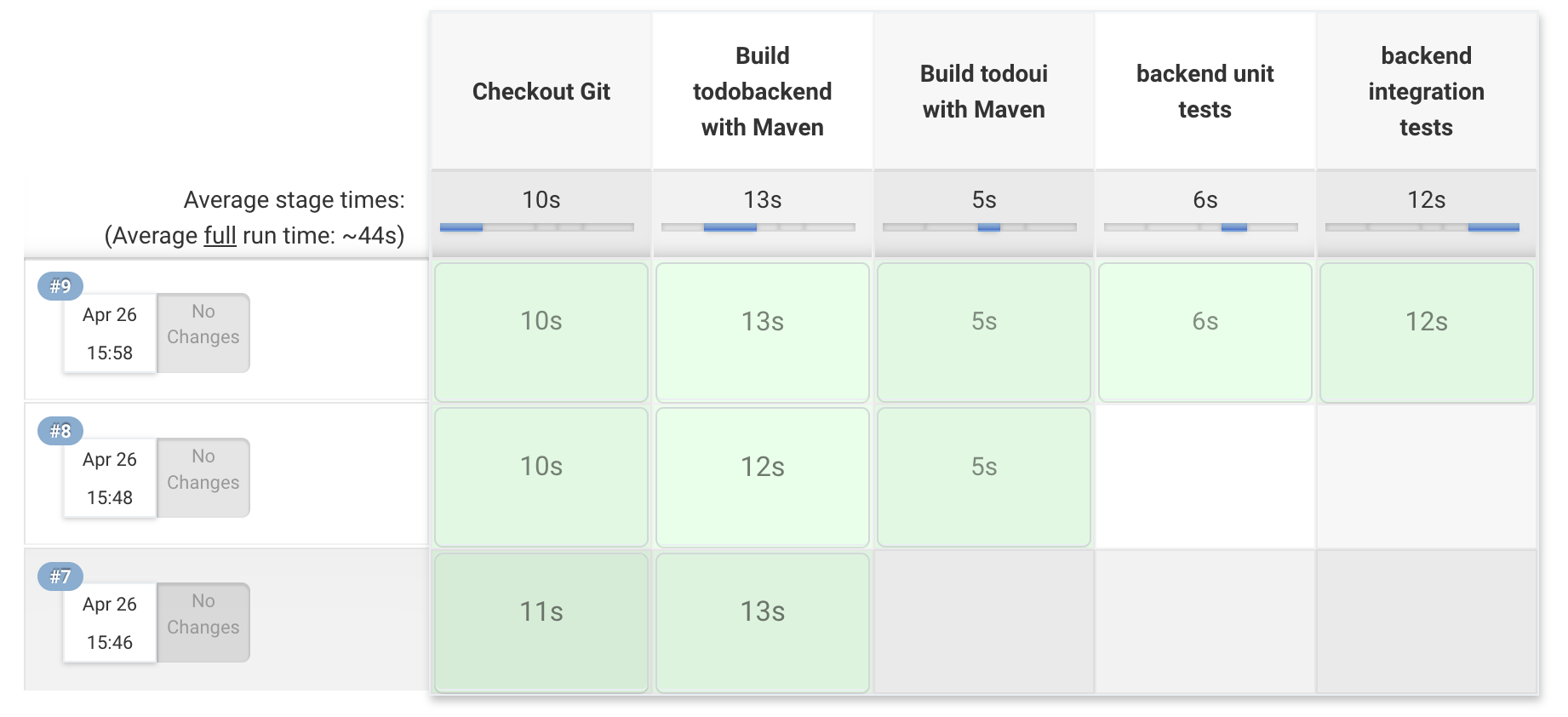
Okay, we know how to speed up unit testing. Lets put this into action with Jenkins by writing a pipeline with the following stages:
- build (compile only) todoui and todobackend
- execute unit tests
- execute all tests
Having two test stages is usually not very clever but shows us the advantages of mocking here: fast feedback is the clever part, e.g.
    stage('Build todobackend with Maven') {
      container('---') {
        dir('todobackend') {
          sh('mvn clean package --batch-mode -DskipTests')
        }
      }
    }

    stage('backend unit tests') {
      container('---') {
        dir('todobackend') {
          sh('---')
        }
      }
    }

    stage('backend integration tests') {
      container('---') {
        dir('todobackend') {
          sh('---')
        }
      }
    }
Info
Backslash must be escaped.
Example:
\ becomes \\
Running those stages right one after another doesn’t make much practical sense of course, but it demonstrates the ability to do so. In the context of this very small application the time difference might be negligible, when scaling out to a large build with hundreds of tests this will save valuable time.
There are different possibilities when to execute specific tests on which stage, but here is one possible suggestion:
- Run (mocked) unit tests when integrating code from a developer to enable fast feedback
- Run integration tests on faked external dependencies (in-memory db) before deploying onto preprod
- Run tests with PROD-like databases and end-to-end tests when generating a release candidate
- On local developer machines it probably depends on the individual tasks the developer is currently working on
As is often the case there is no ‘one solution fits all’, different projects have different testing requirements and therefore require a different strategy.
After successful integration your pipeline should look somewhat similar to this one: